Switch
The switch task is used for creating branching logic. It is a representation of multiple if...then...else or switch...case statements in programming.
Definitions
{
  "name": "switch_task",
  "taskReferenceName": "switch_task_ref",
  "inputParameters": {
    "switchCaseValue": "${workflow.input.service}"
  },
  "type": "SWITCH",
  "evaluatorType": "value-param",
  "expression": "switchCaseValue",
  "defaultCase": [//tasks],
  "decisionCases": {
    "fedex": [//tasks],
    "ups": [//tasks]
  }
}
- A switch task takes an expression as input along with multiple branches containing a sequence of tasks to be executed and a default branch to be executed if no matching branches are found.
- The output of the expression is matched with the name of the branch.
- The expression can be a javascript expression or a value parameter that represents the input to the task directly.
Input Parameters
| Attribute | Description |
|---|---|
| evaluatorType | Indicates the type of evaluator used. Supported types are value-param, javascript, and graaljs. |
| expression | The expression depends on the evaluator type. For the value-param evaluator, the expression is the input parameter; for the javascript and graaljs evaluator, it is the javascript expression. |
| decisionCases | Map where the key is possible values that can result from the expression, with the value being the list of tasks to be executed. |
| defaultCase | List of tasks to be executed when no matching value is found in the decision case (default condition). |
Types of Evaluators
| Attribute | Description |
|---|---|
| value-param | Use a parameter directly as the value. |
| javascript | Evaluate Javascript expressions and compute the value - Legacy. Deprecated - use graaljs instead. |
| graaljs | Evaluate Javascript expressions and compute the value. Allows you to use ES6-compatible Javascript. |
Examples
- UI
- JSON Example
- Add task type
Switch. - Click on the (+) icon to add switch cases.
- Add the value parameter to evaluate for switch.
- Label the cases with values to match.
- Add one more task to the cases.
- Add tasks to default case if applicable.
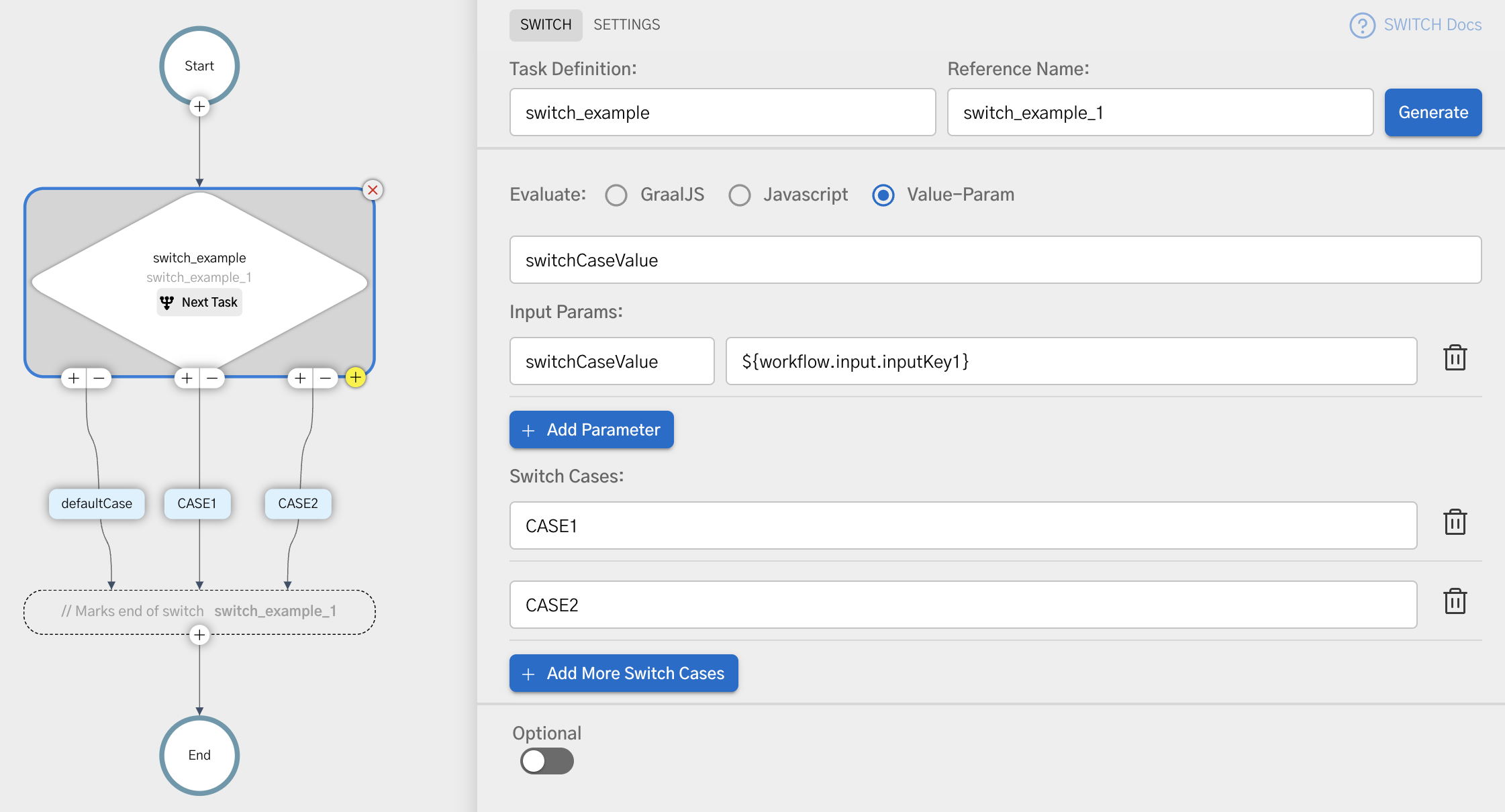
    {
      "name": "switch_example",
      "taskReferenceName": "switch_example_1",
      "inputParameters": {
        "switchCaseValue": "${workflow.input.inputKey1}"
      },
      "type": "SWITCH",
      "decisionCases": {
        "CASE1": [
          // task list for inputKey1 == CASE1
        ],
        "CASE2": [
          // task list for inputKey1 == CASE2
        ]
      },
      "defaultCase": [
        // default task list when inputKey1 does not match any case
      ],
      "evaluatorType": "value-param",
      "expression": "switchCaseValue"
    }
Access Switch Case Output
We can access the output of the switch case in subsequent tasks by referring to the output value selectedCase.
For example, if the switch case reference was switch_example_1 we can access the output value by:
${switch_example_1.output.selectedCase}
Using Javascript Expressions
When using javascript or graaljs as the evaluator type, the expression can be a javascript expression that returns a string.
The input to the tasks is available as the variables inside the $ scope within the script.
    "inputParameters" : {
      "shippingType": "${workflow.input.shippingType}"
    }
    (function () {
      if ($.shippingType == 'EXPRESS') {
        return "FEDEX";
      }
      return "USPS";
    })();
Nested Switch case
Switch task can be nested just like nested if...then...else.
{
  "decisionCases": {
    "fedex": [//tasks],
    "ups": [
      {
        "taskType": "SWITCH",
        "expression": "$.deliveryType == 'same-day' ? 'same_day' : 'regular'",
        "decisionCases": {
            "same_day": [],
            "regular": [],
        }
      }
    ]
  }
}
Similar to any programming language, you can have other operators inside a switch case, such as nested switches, loops, forks, etc.